RCFA - Input Parameter
In order to perform structural analysis of reinforced concrete element/frames. Following parameters are required:
Nodes Details
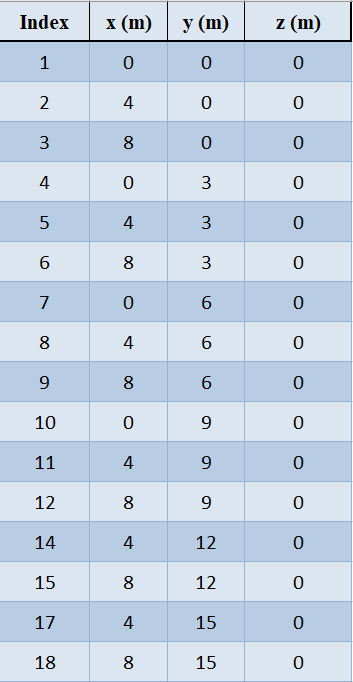
nodes_details is a Mandatory Parameter, represents Nodes details of the reinforced concrete model and should be passed in DataFrame. It gives the joints detail of the reinforced concrete frame. The DataFrame must contain three columns. Nodes details columns are positional arguments. The index of the Dataframe represents Name of the Node, it must be a positive integer.
1st Column must contain x-Coordinate of the nodes in meters (m).
2nd Column must contain y-Coordinate of the nodes in meters (m).
3rd Column must contain z-Coordinate of the nodes in meters (m).
Note: The order of the nodes doesn’t affect the results.
Member Details
member_details is a Mandatory Parameter, represents member details of the reinforced concrete model and should be passed in DataFrame. It presents beams and columns of the reinforced concrete frame. The DataFrame must contain seven columns. Columns of member details are positional arguments.
1st and 2nd Column must contain node number (node ID) between which member is connected.
3rd Column represents the width (b) of the member in millimeter (mm).
4th Column represents the depth (d) of the member in millimeter (mm).
5th Column represents uniformly distributed load (udl) on member in Local x direction in kilonewton per square meter (kN/m2).
6th Column represents uniformly distributed load (udl) on member in Local y direction in kilonewton per square meter (kN/m2).
7th Column represents uniformly distributed load (udl) on member in Local z direction in kilonewton per square meter (kN/m2).
Note:
The order of the members doesn’t affect the results.
It’s capable of taking rectangular and circular cross-sections input.
For rectangular cross-section, both 3rd and 4th columns representing (b and d) must be defined.
For circular cross-section, both 3rd representing (b) must be zero and 4th columns representing (d) must be defined some positive value.

Boundary Conditions
boundarycondition is a Mandatory Parameter, represents boundary condition of the reinforced concrete model and should be passed in DataFrame. It presents the joints condition of the reinforced concrete frame. The DataFrame must contain the base joints (joint connection between frame and ground).
Rest other joints are optional. Boundary conditions have 6 columns representing each degree of freedom (Translation in x, Translation in y, Translation in z, Rotation in x (thetax), Rotation in y (thetay), Rotation in z (thetaz)).
Value for each degree of freedom varies from 0 to 1, 0 representing complete restrained and 1 representing complete freedom for movement (like free end)
Fixed Joint: Assign zero to all six degree of freedom.
Pin Joint: Assign zero to Translations in all three direction
Roller Joint: Assign zero to Translations in all three direction except in the direction of roller.
Boundary conditions columns are positional arguments.
Note: The order of the nodes doesn’t affect the results.

Generate Frame
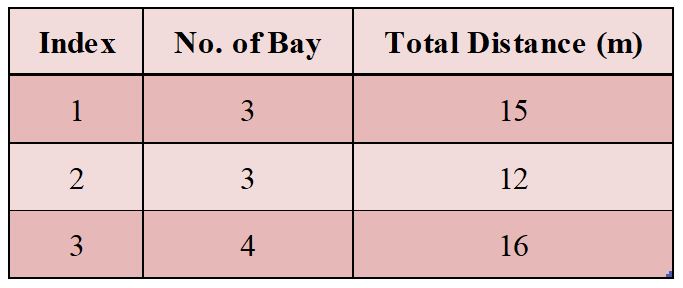
framegen of the reinforced concrete model is an Optional Parameter. It provides an information to automatically generate the reinforced concrete frame and should be passed in DataFrame. Dataframe of Nodal Forces must contain 2 columns representing number of bays and total length along bays in x, y and z direction.
1st Row of DataFrame:
Number of bay in x- direction (Length of RC Frame) - 1st Column of DataFrame
Total distance of bay in x- direction (Total Length of RC Frame) - 2nd Column of DataFrame
2nd Row of DataFrame:
Number of bay in y- direction (Height of RC Frame) - 1st Column of DataFrame
Total distance of bay in y- direction (Total Height of RC Frame) - 2nd Column of DataFrame
3rd Row of DataFrame:
Number of bay in z- direction (Width of RC Frame) - 1st Column of DataFrame
Total distance of bay in z- direction (Total width of RC Frame) - 2nd Column of DataFrame
Default is None i.e. No auto generation
framegen rows and columns are positional arguments.
Nodal Forces Details
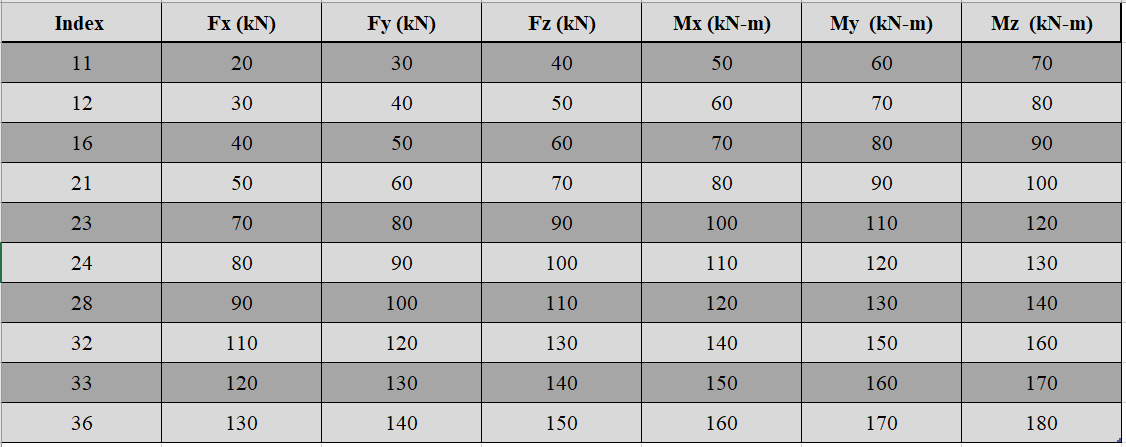
forcesnodal is an Optional Parameter, represents the forces at the joints of the reinforced concrete frame and should be passed in DataFrame. Dataframe of Nodal Forces must contain 6 columns representing force’s and moment’s in every direction. Nodal forces can only be point forces or moments.
Forces applied on joints are in Global Coordinate System.
Force in x (Fx - kN) - 1st Column of DataFrame
Force in y (Fy - kN) - 2nd Column of DataFrame
Force in z (Fz - kN) - 3rd Column of DataFrame
Moment in x (Mx - kNm) - 4th Column of DataFrame
Moment in y (My - kNm) - 5th Column of DataFrame
Moment in z (Mz - kNm) - 6th Column of DataFrame
Default is None i.e. No nodal forces
Nodal forces columns are positional arguments.
Note: The order of the nodes doesn’t affect the results.
Slab Details
slab_details is an Optional Parameter, which represents the floor load of the reinforced concrete frame and should be passed in DataFrame. Dataframe of slab details contains 8 columns representing:
Node 1 to node 4 are the four corners of a trapezoidal slab/floor.
“Node 1” - 1st Column of DataFrame (It should be the node index/id)
“Node 2” - 2nd Column of DataFrame (It should be the node index/id)
“Node 3” - 3rd Column of DataFrame (It should be the node index/id)
“Node 4” - 4th Column of DataFrame (It should be the node index/id)
Thickness of slab or floor in millimeter (mm) - 5th Column of DataFrame
“Floor Finish Load” (Should be passed 0 if no load) - 6th Column of DataFrame
“Live Load” (Should be passed 0 if no load) - 7th Column of DataFrame
“Water Proofing Load” (Should be passed 0 if no load) - 8th Column of DataFrame
Default Value is None i.e. No slab/floor loads.
Slab details columns are positional arguments.
Note: The order of the slab/floor doesn’t affect the results.

Load Combination Details
load_combo is an Optional Parameter,s represents the combination of different loads with load factors acting on the reinforced concrete frame and should be passed in DataFrame. Dataframe of load combination may contain up to 6 columns representing:
“Dead Load” - 1st Column of DataFrame
“Live Load” - 2nd Column of DataFrame
“Seismic Load in x direction” - 3rd Column of DataFrame
“Seismic Load in -x direction” - 4th Column of DataFrame
“Seismic Load in z direction” - 5th Column of DataFrame
“Seismic Load in -z direction” - 6th Column of DataFrame
Default is None (Only Dead Load will be considered with load factor 1)
Load combination columns are positional arguments.
Note: Only one load combination is considered RCF class. To check for different load combination ENV class should be used.

Seismic Definition
seismic_def is a parameter for Seismic definition of the reinforced concrete model and is an Optional Parameter. It is required when user want to perform the Equivalent Static Seismic Analysis and should be passed in DataFrame or numerical value.
Dataframe should be used when seismic definition is as per IS1893:2016. Value of Time Period in seconds must be passed when seismic analysis is to be done with some other standard codes.
Dataframe of seismic definition may contain up to 6 columns representing:
“Seismic Zone Factor (Z)” - 1st Column of DataFrame
“Response Reduction Factor (R)” - 2nd Column of DataFrame
“Design Acceleration Coefficient for Different Soil Type (Sag) optional parameter if using IS1893” - 3rd Column of DataFrame
“Damping (%) optional parameter if using IS1893” - 4th Column of DataFrame
“Soil Type (1 for Hard/Rocky Soil Type, 2 for Medium Soil Type and 3 for Soft Soil Type) Mandatory parameter if using IS1893” - 5th Column of DataFrame
“Time Period (sec) optional parameter if using IS1893” - 6th Column of DataFrame
Default is None (No Seismic Analysis).
Seismic Definition columns are positional arguments.
Note: Soil Type is needed only for seismic analysis as per IS1893:2016. If user wishes to use some other code, values of “z”, “I”, “R” and “Sag” must be provided

Material Properties
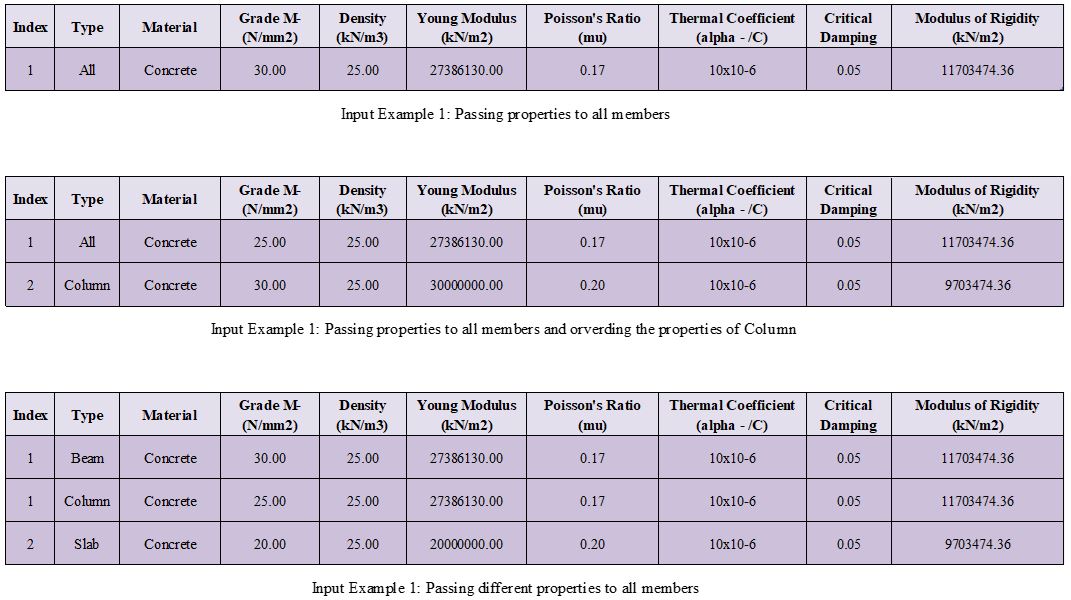
properties represents material properties of the members of reinforced concrete model and is an Optional Parameter. It is required when user want to use some other material or concrete with different properties, should be passed as DataFrame. Dataframe of material properties may contain up to 9 columns representing:
“Type” - 1st Column of DataFrame
“Material” - 2nd Column of DataFrame
“Grade M- (N/mm2)” - 3rd Column of DataFrame
“Density (kN/m3)” - 4th Column of DataFrame
“Young Modulus (E -kN/m2)” - 5th Column of DataFrame
“Poisson’s Ratio (mu)” - 6th Column of DataFrame
“Thermal Coefficient (alpha)” - 7th Column of DataFrame
“Critical Damping” - 8th Column of DataFrame
“Modulus of Rigidity (G -kN/m2) ” - 9th Column of DataFrame
Default is None (Concrete). Concrete with following properties:”**
Concrete of Grade M25- 25 N/mm2 is being used as default.
Young Modulus (E - kN/m2) = 5000 * sqrt(25)
Poisson’s Ratio (mu) = 0.17
Thermal Coefficient (alpha) =
Modulus of Rigidity (G -kN/m2) = E/ (2*(1+mu))
Critical Damping = 0.05 (5%)
Type: “All”- Properties assigned to every member (Beam, Column and Slabs)
“Beam”- Properties assigned to only beams
“Column”- Properties assigned to only columns
“Slab”- Properties assigned to only slabs
Note: Succeeding “Type” arguments overrides previous type. If “Beam” follows after “All” type, Beams properties will be modified.
Material Properties columns are positional arguments.
Concrete Grade
grade_conc represents concrete grade of the members of reinforced concrete model and is an Optional Parameter. It is required when user want to only change the Grade of Concrete of the default concrete grade i.e. M25. The value of Young modulus, modulus of rigidity is calculated as per the formula mentioned in Material Properties.
Default is None (Concrete M25- Compressive Strength of 25 N/mm2).
Self Weight
self_weight represents self weight of the members of reinforced concrete model and is an Optional Parameter. It should be passed as Boolean operator. It determines, if self weight of the members has to be included in analysis or not.
Default is True (Self Weight will be considered).
Infillwall
infillwall represents infillwall of the reinforced concrete model and is an Optional Parameter. It determines if infillwall will be considered while calculating Time Period during seismic analysis or not and should be passed as Boolean.
Default is False (Infillwall will not be considered).
Note: Infillwall argument has to be only provided when Seismic analysis is being done as per IS1893:2016 Part 1.
Autoflooring
autoflooring is an Optional Parameter and helps greatly in reducing the work load of inputting every slab detail on a reinforced concrete frame. Autoflooring argument, automatically apply slab/floor load, making easy for the user to manipulate and should be passed as Boolean operator.
Default is False (Autoflooring will not be considered).
If Autoflooring is True. Default values are-
Thickness of Floor is 150 millimeters (mmm)
Floor Finish Load (FF): 1 kN/m2
Live Load (LL): 3 kN/m2
“Waterproofing Load “: 0 kN/m2.
Note: It can further be changed using class method Strucpy.RCFA.RCF.changeFL() as per the requirement.
Point Loads
point_loads represents point loads acting on the member or members of reinforced concrete model. It is an Optional Parameter. It is required when user want to place point loads on a member, should be passed as DataFrame. Dataframe of point loads contains up to 3 columns representing:
“Load in (kN)” - 1st Column of DataFrame.
“Direction” i.e (x, y or z) in local coordinate system - 2nd Column of DataFrame.
“Distance (m)” from node which is nearer to the origin - 3rd Column of DataFrame.
Index must be ID/Name of the member on which point load is acting.
Default is None. (No point Loads)
Note: It’s capable of handling multiple point loads.
Point loads columns are positional arguments.

Stability Index
col_stablity_index represents stability index of a reinforced concrete member/frame and is an Optional Parameter. Stability index value helps in classifying columns as sway or non-sway. Its value can be passed as per the user requirement.
Default value is 0.04. (IS456:2000).